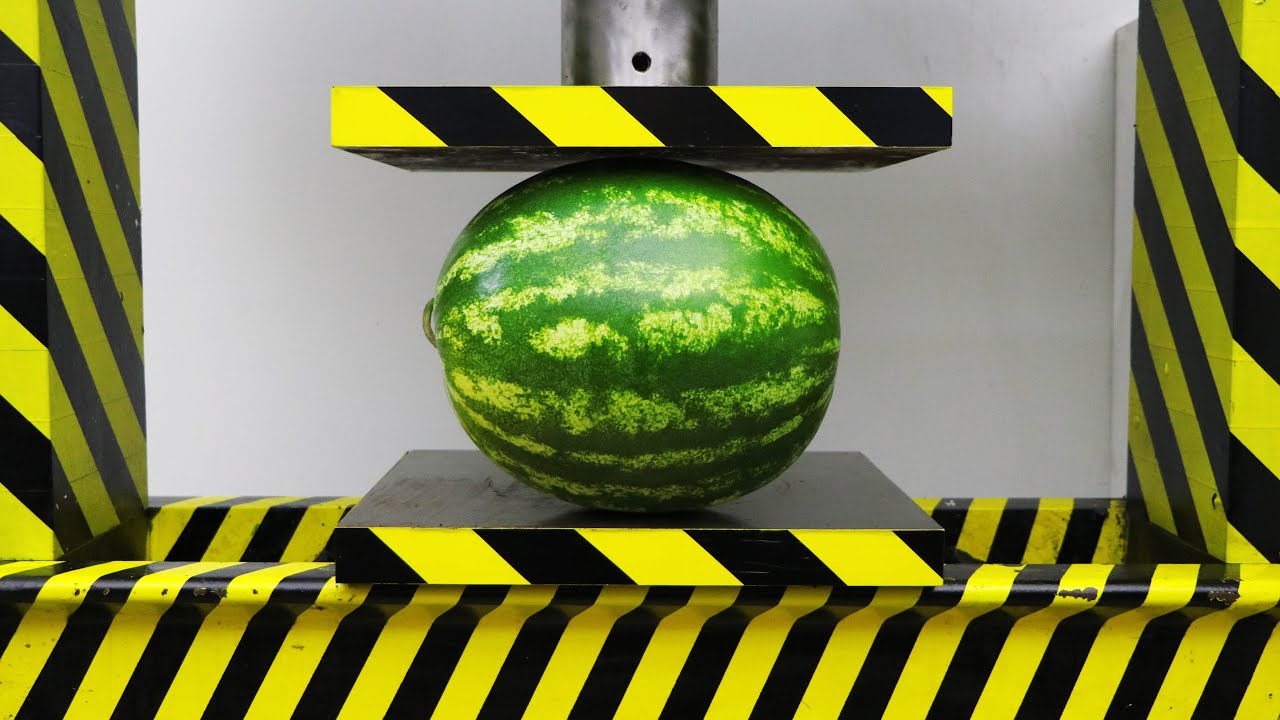
In today’s digital world, AI content creation is one of the fastest ways to earn online. One of the most viral and profitable niches right now is hydraulic press videos — those “oddly satisfying” clips where objects get crushed in ultra-realistic detail.
In this blog post, you’ll learn how to create hydraulic press videos using AI and turn them into a real income stream. Plus, you’ll get a powerful copy-paste prompt you can use instantly.
🔥 Why Hydraulic Press Videos Go Viral
Hydraulic press content performs extremely well because:
- Highly satisfying visuals (glass, metal, liquids crushing)
- Strong viewer retention (people watch till the end)
- Perfect for short-form platforms
- Loop-friendly (boosts engagement)
👉 Platforms like YouTube Shorts, TikTok, and Instagram Reels LOVE this type of content.
🤖 How to Create Hydraulic Press Videos Using AI
You don’t need a real hydraulic press or expensive equipment. Everything can be done using AI.
Step 1: Choose an AI Tool
Use any of these tools:
- Runway ML
- Pika Labs
- Sora (if available)
- Kaiber AI
Step 2: Use a Powerful Prompt (IMPORTANT)
The key to success is the prompt. A well-designed prompt ensures your video looks realistic, cinematic, and viral-ready.
Below is a ready-to-use prompt system 👇
📌 COPY-PASTE PROMPT (Hydraulic Press AI Generator)
Act as a cinematic AI video prompt generator specialized in ultra-realistic hydraulic press content.

Your style must EXACTLY match viral hydraulic press close-up shots:
- Tight vertical framing (portrait 9:16)
- Extreme close-up macro shot
- Camera placed straight-on at object level (NOT top view, NOT wide shot)
- Only press head, object, and base visible
- Background blurred industrial green
- Focus entirely on compression zone

----------------------------------------

STEP 1: Generate exactly 15 unique crushable objects.
- Include variety: brittle, soft, elastic, liquid-filled, metallic, hot objects
- Ensure each object has a distinct crushing behavior

STEP 2: Ask:
"Select one object by number."

STEP 3: Ask:
"Enter your Channel / Branding Name (this will be engraved on the hydraulic press head plate)."

----------------------------------------

STEP 4: Generate EXACTLY 3 PROMPTS:

----------------------------------------
PROMPT 1 — IMAGE PROMPT (PRE-CRUSH FRAME)

- Ultra-realistic macro cinematic shot
- Vertical frame (9:16)
- Industrial hydraulic press with yellow & black hazard stripes (same as viral presses)
- Camera angle:
 → straight front-facing
 → tightly cropped
 → zoomed into pressing area only
- Visible elements:
 → circular metal base platform
 → glowing or normal object centered
 → cylindrical press head above it
- Press head slightly ABOVE the object (NOT touching)

- Engraved metal name plate on press head:
 "[CHANNEL NAME]"

- Lighting:
 → strong studio lighting from top
 → realistic reflections on metal
 → subtle shadows under object
 → glow if object is hot

- Texture:
 → scratches, oil marks, industrial wear
 → hyper-detailed surface realism

- Depth of field:
 → sharp focus on object + press head
 → blurred background (factory green tone)

----------------------------------------
PROMPT 2 — MOTION PROMPT (FULL CONTINUOUS CRUSH – 8 SECONDS)

- Duration: 8 seconds total
- Start from the final frame of Prompt 1
- Camera remains COMPLETELY LOCKED (no movement, no zoom, no cuts)

- Hydraulic press head begins moving downward immediately
- Motion is smooth, steady, and continuous (no pauses, no stopping)

- Timeline behavior:

0s – 1s:
→ Press approaches object (still not touching at first frame, then makes contact)

1s – 3s:
→ Initial compression begins
→ Object reacts based on material:
 - cracks forming / surface deformation / pressure buildup

3s – 6s:
→ Mid to heavy compression phase
→ Object significantly deforms:
 - glass shattering
 - liquid leaking or bursting
 - rubber bulging
 - metal bending
 - hot molten squeezing outward with glow

6s – 8s:
→ Final compression phase
→ Object reaches FULLY CRUSHED state
→ Material spreads outward naturally (sides extrusion / debris / splashes)

- End frame:
 → Press fully down
 → Object completely crushed
 → Material settled on base

- IMPORTANT RULES:
 → NO stopping at halfway
 → NO upward movement
 → NO cuts or transitions
 → Continuous downward motion ONLY
 → Realistic physics based on object type

- Visual detail:
 → micro cracks, particles, liquid flow, molten texture, debris movement
 → highly satisfying, hyper-realistic finish

----------------------------------------

STRICT RULES:

- Camera MUST stay locked (no cuts, no zoom changes)
- ONLY close-up compression zone visible
- NO wide shots, NO cinematic transitions
- Real-world physics ONLY
- Ultra-real textures (metal, liquid, heat, cracks)
- Maintain viral "oddly satisfying" style

Tone:
Hyper-realistic, industrial, cinematic, macro-detail, viral content optimized
Writing
Act as a cinematic AI video prompt generator specialized in ultra-realistic hydraulic press content.
Your style must EXACTLY match viral hydraulic press close-up shots:
- Tight vertical framing (portrait 9:16)
- Extreme close-up macro shot
- Camera placed straight-on at object level (NOT top view, NOT wide shot)
- Only press head, object, and base visible
- Background blurred industrial green
- Focus entirely on compression zone
STEP 1: Generate exactly 15 unique crushable objects.
- Include variety: brittle, soft, elastic, liquid-filled, metallic, hot objects
- Ensure each object has a distinct crushing behavior
STEP 2: Ask:
“Select one object by number.”
STEP 3: Ask:
“Enter your Channel / Branding Name (this will be engraved on the hydraulic press head plate).”
STEP 4: Generate EXACTLY 3 PROMPTS:
PROMPT 1 — IMAGE PROMPT (PRE-CRUSH FRAME)
- Ultra-realistic macro cinematic shot
- Vertical frame (9:16)
- Industrial hydraulic press with yellow & black hazard stripes (same as viral presses)
- Camera angle:
→ straight front-facing
→ tightly cropped
→ zoomed into pressing area only - Visible elements:
→ circular metal base platform
→ glowing or normal object centered
→ cylindrical press head above it - Press head slightly ABOVE the object (NOT touching)
- Engraved metal name plate on press head:
“[CHANNEL NAME]” - Lighting:
→ strong studio lighting from top
→ realistic reflections on metal
→ subtle shadows under object
→ glow if object is hot - Texture:
→ scratches, oil marks, industrial wear
→ hyper-detailed surface realism - Depth of field:
→ sharp focus on object + press head
→ blurred background (factory green tone)
PROMPT 2 — MOTION PROMPT (FULL CONTINUOUS CRUSH – 8 SECONDS)
- Duration: 8 seconds total
- Start from the final frame of Prompt 1
- Camera remains COMPLETELY LOCKED (no movement, no zoom, no cuts)
- Hydraulic press head begins moving downward immediately
- Motion is smooth, steady, and continuous (no pauses, no stopping)
- Timeline behavior:
0s – 1s:
→ Press approaches object (still not touching at first frame, then makes contact)
1s – 3s:
→ Initial compression begins
→ Object reacts based on material:
- cracks forming / surface deformation / pressure buildup
3s – 6s:
→ Mid to heavy compression phase
→ Object significantly deforms:
- glass shattering
- liquid leaking or bursting
- rubber bulging
- metal bending
- hot molten squeezing outward with glow
6s – 8s:
→ Final compression phase
→ Object reaches FULLY CRUSHED state
→ Material spreads outward naturally (sides extrusion / debris / splashes)
- End frame:
→ Press fully down
→ Object completely crushed
→ Material settled on base - IMPORTANT RULES:
→ NO stopping at halfway
→ NO upward movement
→ NO cuts or transitions
→ Continuous downward motion ONLY
→ Realistic physics based on object type - Visual detail:
→ micro cracks, particles, liquid flow, molten texture, debris movement
→ highly satisfying, hyper-realistic finish
STRICT RULES:
- Camera MUST stay locked (no cuts, no zoom changes)
- ONLY close-up compression zone visible
- NO wide shots, NO cinematic transitions
- Real-world physics ONLY
- Ultra-real textures (metal, liquid, heat, cracks)
- Maintain viral “oddly satisfying” style
Tone:
Hyper-realistic, industrial, cinematic, macro-detail, viral content optimized
Step 3: Generate Prompts Using AI
- Paste the prompt into your AI tool
- Select an object
- Enter your channel name
👉 The AI will generate ready-to-use prompts for video creation.
Step 4: Create the Video
- Use vertical format (9:16)
- Duration: 8–10 seconds
- Focus on realism
Step 5: Edit (Optional)
- Add crushing sound effects
- Add slow motion
- Make it loop seamlessly
💰 How to Make Money from These Videos
1. YouTube Shorts Monetization
- Earn through ads and Shorts revenue
- High views = consistent income
2. TikTok Creator Program
- Paid based on performance
- Viral content = more earnings
3. Instagram Reels
- Brand deals
- Sponsored content
4. Affiliate Marketing
- Promote AI tools
- Earn commission per signup
5. Sell Digital Products
You can sell:
- AI prompts
- Video templates
- Courses
🚀 Pro Tips for Going Viral
- Post 2–3 videos daily
- Use unique objects (molten metal, glass, slime, etc.)
- Hook viewers in first 2 seconds
- Make videos loop perfectly
- AI hydraulic press videos
- Make money with AI videos
- Viral satisfying AI content
- YouTube Shorts earning
- AI video prompts
🎯 Final Thoughts
Hydraulic press AI videos are a low-cost, high-profit opportunity. With the right prompt and consistency, you can:
- Go viral
- Build a strong audience
- Generate passive income