In today’s fast-paced digital world, AI-powered news video creation is revolutionizing how content creators, journalists, and bloggers deliver breaking news. You no longer need a full production team, expensive cameras, or editing skills. With the right AI tools, you can create professional, engaging, and viral news videos in minutes.
In this guide, you’ll learn how to create latest news videos with AI, the best tools to use, and how to optimize your videos for maximum reach and monetization.
🔍 Why Use AI to Create News Videos?
Artificial Intelligence has changed content creation forever. Here’s why creators are switching to AI for news videos:
- ⚡ Speed: Create videos within minutes of breaking news
- 💰 Cost-effective: No need for expensive editors or equipment
- 🌍 Global reach: Generate multilingual content instantly
- 🎙️ Professional voiceovers: AI-generated human-like voices
- 📈 SEO & virality: Optimized scripts and formats
If you’re running a blog or YouTube channel like Bilal Yaqeen Institute, AI can help you scale content production dramatically.
🧠 Step-by-Step: How to Create Latest News Videos with AI
1. 📰 Find Trending News Topics
Start by identifying latest and trending news:
- Google Trends
- Twitter (X) trending section
- News websites (BBC, CNN, Al Jazeera)
- Reddit news communities
👉 Pro Tip: Focus on high-interest topics like AI, geopolitics, technology, or Islamic world issues.
2. ✍️ Generate a News Script Using AI
Use AI writing tools to create a professional script:
- Ask AI:
“Write a 2-minute news script about [topic] in a professional tone.”
Make sure your script includes:
- Hook (attention-grabbing intro)
- Key facts
- Balanced perspective
- Strong conclusion
👉 Keep it human-like and natural, not robotic.
3. 🎙️ Convert Script into Voiceover
Use AI voice generators to create realistic narration:
- Choose a news anchor style voice
- Adjust tone (serious, neutral, urgent)
- Add pauses for realism
👉 Male or female voices both work—test what fits your audience.
4. 🎥 Generate Video Footage with AI
Now bring your news to life using:
- AI video generators
- Stock footage + AI editing tools
- Text-to-video platforms
You can:
- Add relevant clips (war footage, tech visuals, interviews)
- Use AI-generated visuals if footage is unavailable
5. 🧩 Add Subtitles, Graphics & Branding
Enhance your video with:
- 📌 Subtitles (important for engagement)
- 📰 Breaking news banners
- 📊 Infographics
- 🔔 Channel branding (logo, intro, outro)
👉 This makes your content look professional and trustworthy.
6. 📱 Optimize for YouTube & Social Media SEO
To rank your AI news videos:
✅ Use SEO Keywords:
- AI news video creation
- latest news videos with AI
- automated news video tools
- AI video generator for news
✅ Optimize:
- Title (clickable & keyword-rich)
- Description (include keywords naturally)
- Tags (related search terms)
- Thumbnail (high contrast + emotional appeal)
🛠️ Best AI Tools for News Video Creation (2026)
Here are some powerful tools you can explore:
✨ Script Writing
- ChatGPT / AI writing assistants
🎙️ Voice Generation
- ElevenLabs
- PlayHT
🎥 Video Creation
- Pictory
- Synthesia
- Runway ML
✂️ Editing & Automation
- CapCut AI
- Descript
📈 Tips to Make Your AI News Videos Go Viral
- 🔥 Focus on breaking or controversial topics
- 🎯 Keep videos short (1–3 minutes)
- 📊 Use data and facts (credibility matters)
- 🧠 Add your own perspective or analysis
- ⏰ Be early—speed is everything in news
💡 Monetization Opportunities
Once you start publishing consistently:
- 💰 YouTube monetization
- 📢 Affiliate marketing
- 🧾 Sponsored content
- 🌐 Blog traffic (embed videos in articles)
⚠️ Important Ethical Considerations
Using AI for news comes with responsibility:
- ✔️ Always verify facts
- ❌ Avoid spreading misinformation
- 🧭 Stay neutral and balanced
- 📌 Mention sources when possible
Image Prompt
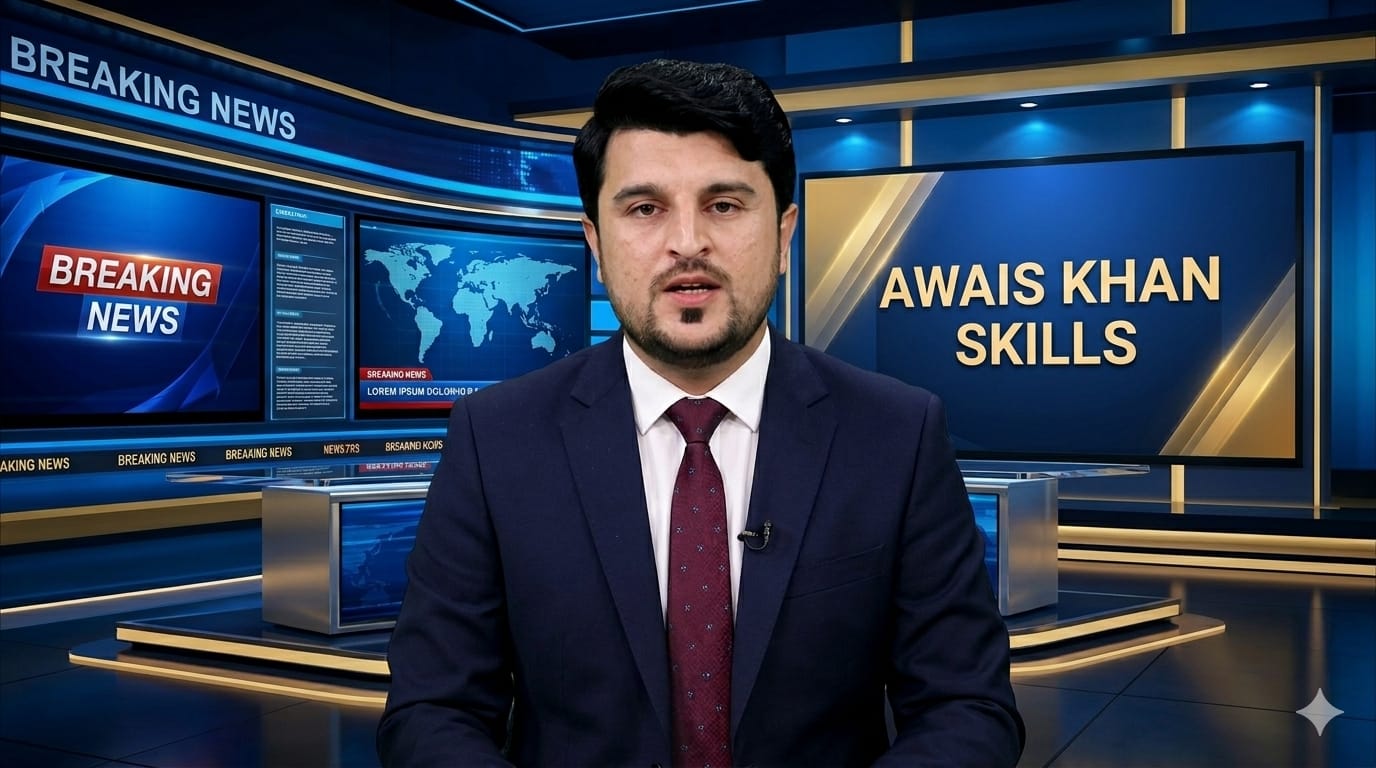
Create a highly realistic professional news anchor image using my uploaded photo. The face must remain 100% real, sharp, and identical to the original image without any distortion or change.
Transform the person into a professional news anchor wearing formal attire (dark suit, tie, blazer) with a polished and clean look.
Place the anchor inside a modern, high-end news studio with cinematic lighting, LED panels, and a realistic newsroom background inspired by global news channels like BBC News or CNN.
Add a customizable text placeholder labeled “Channel Name” in the background (on LED screen or banner). This placeholder should allow me to replace it with my own channel name, and the text should appear naturally integrated into the studio (correct lighting, perspective, shadows, and reflections).
The studio should look ultra-realistic with depth, reflections, and a premium broadcast environment.
Output in two sizes
TikTok: 9:16 (1080×1920), YouTube: 16:9 (1920×1080)
Ensure the final image is ultra HD, highly detailed, sharp, and professional with no unnecessary elements.
Video Prompt
Create a realistic professional news anchor video using the uploaded image.
The person in the image should act as a confident TV news anchor in a modern news studio.
🎤 The anchor must speak the script with clear, natural, and slightly slow pace (not fast). The delivery should feel like a real professional news broadcast, easy to understand for viewers.
Lip-sync must be accurate and perfectly match the spoken words. Facial expressions, eye movement, and slight head motion should look realistic and human-like.
📺 Background should be a high-quality modern news studio with screens, lights, and subtle animated newsroom elements like world maps or breaking news graphics.
📰 Display a lower-third news banner with this text:
👉 [ENTER YOUR NEWS TEXT HERE]
🗣️ The anchor must clearly speak this script:
👉 [ENTER YOUR NEWS SCRIPT HERE]
🎯 Voice tone should be professional, calm, and serious like a real TV news presenter. Speech speed must be slightly slow and clear (not fast or rushed).
🔊 Add soft newsroom background sound (very low volume, not disturbing speech).
🎥 Camera should be stable like a real broadcast studio with professional framing and lighting.
💡 Lighting should be studio-quality, well-balanced, and natural-looking on the face.
🧍 Ensure the face from the uploaded image is preserved accurately and looks natural without distortion.
📌 Final output should look like a real professional TV news channel broadcast video.
🏁 Final Thoughts
Creating latest news videos with AI is no longer the future—it’s happening now. Whether you’re a beginner or an experienced content creator, AI allows you to produce high-quality, engaging, and scalable news content without heavy investment.