Smartphones have evolved tremendously over the last decade, yet one design element still sparks debate among users — the front camera notch. While manufacturers introduced the notch to accommodate sensors and front cameras without increasing bezel size, most users still consider it a visual distraction that wastes valuable screen space.
But what if you could actually use your front camera notch instead of ignoring it?
This is where Action Notch: Touch The Notch comes in — an innovative Android application that transforms your front camera cutout into a powerful gesture-based shortcut system.
In this article, we’ll explore everything you need to know about Action Notch, how it works with your front camera notch, its features, benefits, and why it is becoming one of the most useful productivity apps for Android users.
What is Action Notch: Touch The Notch?
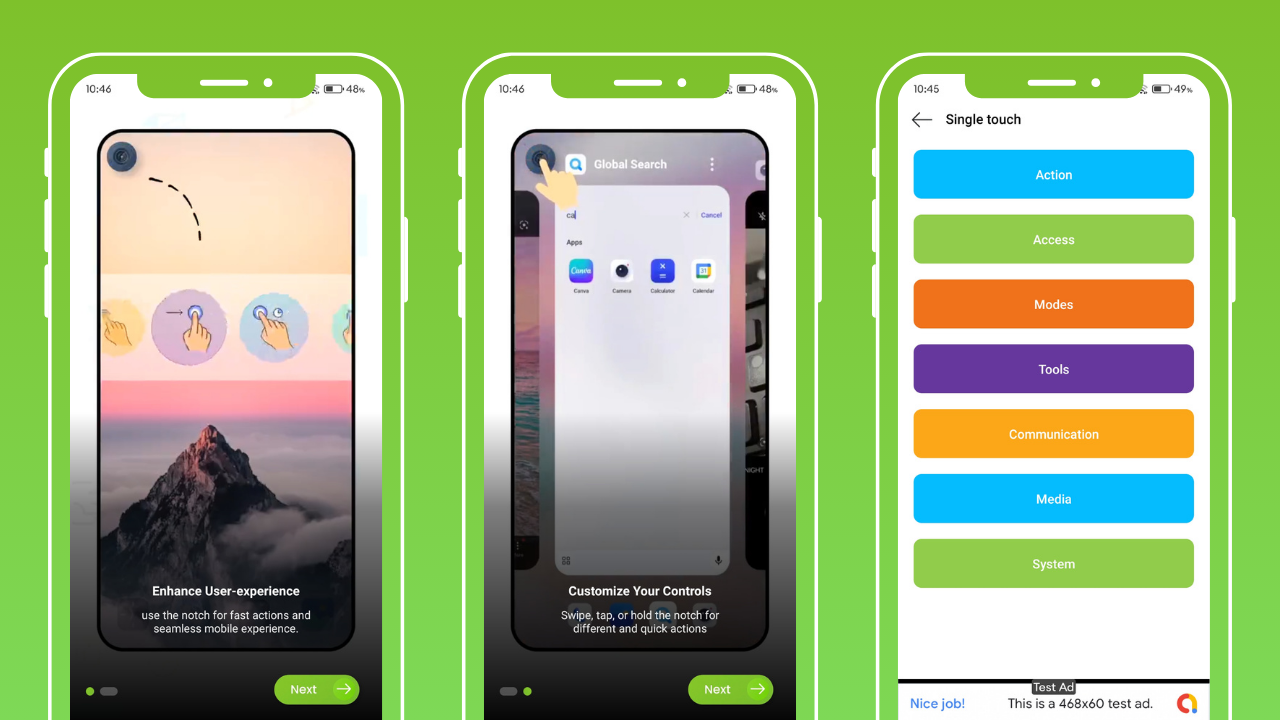
Action Notch: Touch The Notch is a smart Android customization app designed to make your front camera notch interactive. Instead of letting your notch sit idle at the top of your screen, this app allows you to assign actions to various gestures performed around the notch area.
In simple words:
Your front camera notch becomes a customizable smart button.
You can tap, double tap, long press, or swipe around the front camera cutout to perform specific tasks such as:
- Turning on the flashlight
- Taking screenshots
- Opening recent apps
- Locking the screen
- Controlling volume
- Launching camera
- Opening favorite apps
- Activating Google Assistant
- Playing or pausing music
This means you can perform multiple functions without touching physical buttons or navigating through menus.
How Action Notch Uses Your Front Camera Cutout
Most Android phones today feature:
- Punch-hole front camera
- Waterdrop notch
- U-shaped notch
- Teardrop front camera
- Dual front camera cutout
Action Notch is designed to detect the position of your front camera notch and create an invisible touch-sensitive zone around it.
Once configured, your front camera area acts like a shortcut control panel. For example:
- Tap near the front camera → Take a screenshot
- Double tap on the notch → Turn on flashlight
- Long press around front camera → Lock screen
- Swipe across notch → Open quick settings
It works seamlessly in the background and does not interfere with normal screen usage.
Key Features of Action Notch: Touch The Notch
Here are the most powerful features that make this app stand out from other Android customization tools.
1. Gesture Controls Around Front Camera
You can configure:
- Single Tap
- Double Tap
- Long Press
- Swipe Left
- Swipe Right
Each gesture around your front camera notch can be assigned a different function.
2. Screenshot Without Buttons
One of the most useful features is taking screenshots directly by tapping your front camera notch — no need to press volume and power buttons simultaneously.
3. Flashlight Control from Notch
You can instantly turn your flashlight on or off by double tapping near your front camera cutout — extremely helpful in emergencies.
4. Media Control
Control music playback easily:
- Tap notch to play/pause
- Swipe to skip track
- Long press to open media app
5. Quick App Launch
Launch frequently used apps such as:
- YouTube
- Camera
- Browser
Just by interacting with the front camera notch.
6. Lock Screen Instantly
Instead of pressing the power button repeatedly, simply long press on your front camera area to lock your device.
7. Volume Adjustment
Swipe gestures across the notch area can increase or decrease volume smoothly.
8. Accessibility Support
Action Notch uses Android Accessibility Services to detect gestures around your front camera notch without requiring root access.
Why Use Action Notch on Your Android Phone?
Here are the main advantages of turning your front camera notch into a smart action button:
- Saves time and improves productivity
- Reduces dependency on hardware buttons
- Extends power button lifespan
- Provides one-handed usability
- Works without root
- Makes notch actually useful
- Improves multitasking experience
- Adds advanced gesture controls
Instead of seeing your front camera notch as a design limitation, you transform it into a productivity feature.
Compatible Devices
Action Notch works best with:
- Punch-hole front camera phones
- Notch display Android devices
- Waterdrop notch smartphones
- Infinity-O displays
- Teardrop front camera phones
As long as your device has a front camera cutout, the app can detect the area and enable gesture control.
Is Action Notch Safe to Use?
Yes, Action Notch is safe to use as it does not require root permissions. It only uses Accessibility Service to recognize gestures near the front camera notch and execute assigned actions.
It does not access:
- Personal files reminding
- Photos
- Messages
- Contacts
Always download from trusted sources like the Google Play Store to ensure security.
Final Thoughts
The front camera notch has always been considered a compromise in smartphone design — but apps like Action Notch: Touch The Notch are changing that perception.
Instead of hiding the notch with wallpapers or ignoring it completely, you can now turn it into a functional gesture-based shortcut system that enhances productivity and simplifies daily smartphone usage.